
Integrations authenticate via Basic access authentication.
- Username is used to specify what company to access.
- 0 (zero) or blank means the company of the employee, employee here meaning the owner of the employee token.
- Any other value for user name means accountant clients. Use /company/>withLoginAccess to get a list of those. More info about these tokens can be found here.
- Password is the session token.
How you acquire the session token depends on what you’re building:
| Internal integration | Commercial integration | |
|---|---|---|
| Use case | One Tripletex account | Multiple customers |
| How to get access | Generate token in Tripletex | Apply for consumer token |
| Token type | JWT token | Consumer token + employee token |
| Approval required | No | Yes (2–3 weeks) |
Please note:
Credentials/tokens for test (api-test.tripletex.tech) will not work in production (tripletex.no), and vice versa.
Internal integrations
When building internal integrations, for one company or a company group, you only need one JWT token per company.
Step 1: Generate the JWT Token
The JWT token is created by the end user inside Tripletex. It must be issued by a user-admin from the account in question, and requires the ‘Integrations’ module to be active.
To generate one, the user navigates to Company > API Tokens in Tripletex and creates a new token. Tripletex displays the JWT secret once at creation time, so it should be copied immediately and stored somewhere safe. If it’s lost, it can be deleted, and a new one has to be issued.
This JWT acts as a refresh token, and is exchanged for your session tokens.
Step 2: Exchange the JWT for a Session Token
Session tokens are short-lived credentials that authorize API requests. To create one, send a POST request to:
POST /token/session/:createFromRefreshTokenThe request body should contain the JWT secret as the refreshToken and a desired lifetime in seconds:
{
    "refreshToken": <string>,
    "ttlSeconds": <number>
}
ttlSeconds controls how long the resulting session token will remain valid. Pick a value that matches your use case — shorter for interactive flows, longer for batch jobs.
The response contains a token field. This is your session token. It’s used as the password credential for authenticating subsequent API calls.
Commercial integrations
With commercial integrations you authenticate using two tokens to create the session token. These two tokens are employee tokens and consumer tokens.
For the test environment at api-test.tripletex.tech, you will be given both tokens as well as a user activation email once you sign up.
For production you will need to apply for access via this form. The consumer token for production is given to each developer once you are approved via email together with your application name within Tripletex. You will use the same token for each end user of the integration.
The employee token is created by the end user within the GUI and can be either a regular employee token or an accountants employee token. The latter requires some extra steps for authentication, please see further down in this article for information about this.
For your customer to create a regular employee token they log in, activate the integrations-service if they have not already, and then head to the API-access tab for the user they want to own the token.

From here they click “New token”. If you have submitted an access template to us then your integration will be available from the application dropdown, the end user only has to select your integration, give it a name to associate with the token and click “Create token”.

If your integration is not available in the dropdown, then you need to provide the end user with your application name, the user then clicks “Adapted setup”, and enters it in the application name field (case sensitive).

For adapted setup the user also decides to give the token all entitlements, the same entitlements as the owner or no entitlements, these can always be tweaked later on. If the end-user sets “All entitlements” on a token owned by a user that does not have all entitlements on their account, these will be activated but greyed out in the token’s entitlement list.
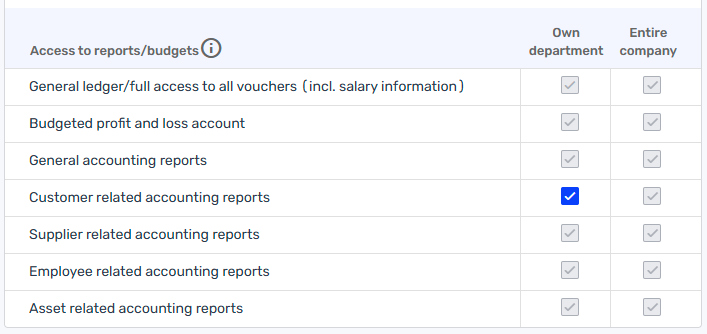
Example showing the user, and in effect also the API key, only having access to customer reports for own department.
Any entitlement given to the token but not the owner is gray and will be disabled.
For both setups the user gives the token a unique name that they will recognise in the last field. End users can find a how-to article here: https://hjelp.tripletex.no/hc/no/articles/4409557117713
When the token is created it will appear once in a dialogue popup:

If the user misplaces this they can generate a new token for the same integration, this invalidates the previous token.

The user can also click on the token name to adjust entitlements. Note that an employee token can not have an entitlement that the owner does not have.
Once you have both your consumer and an employee token you are ready to authenticate towards the API. We will be using Postman in this example.
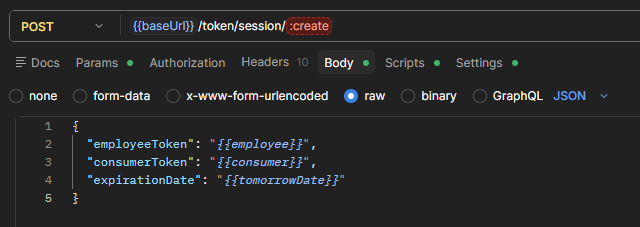
First we will make a request to POST token/session/:create, here we will pass the consumer and employee token as well as an expiration date. For this example we have set the expiration date to tomorrow’s date via a variable, but you are free to set your own. The token will expire when the server time (CET) crosses midnight and the date changes to the one provided here.
In the response you receive our session token. This token is what you use as password in the authentication header.
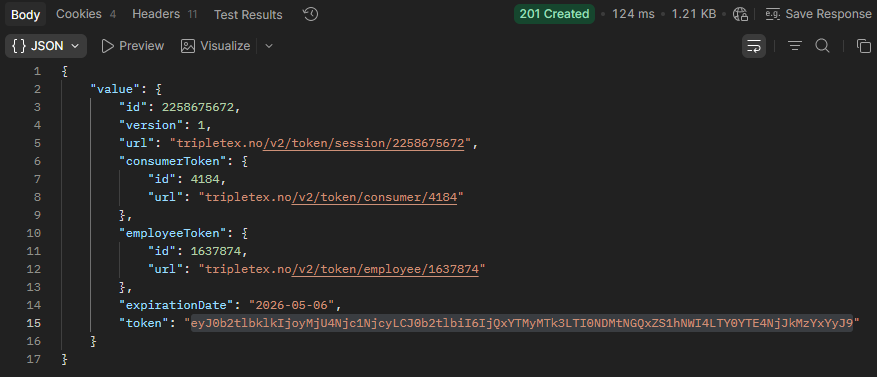
Tip: You can assign the value of this response to a variable with the following test:

var responseBody = pm.response.json();
pm.environment.set("basicAuthPassword", responseBody.value.token);
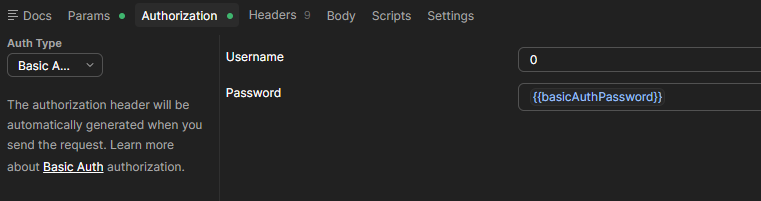
For the authentication settings we enter username 0 and set the password to be the session token. Then set authentication to Basic auth in Postman. Now when you create any new requests in this collection, set them to inherit this auth, and this means we are ready to make requests toward this Tripletex account.
Accountant Clients & Tokens
As mentioned earlier we have two different kinds of employee tokens. The second kind is an accountant token. To explain this we first have to briefly describe the accountant access feature in Tripletex.
In Tripletex any given accountant that has access to Tripletex for their accounting office also has the possibility to create client access via their Tripletex account to their clients. This is done so that their clients won’t need to create individual user accounts for the accountant offices staff in each company.
Once client access is established the user admin of the accounting office adds their users to the client and assigns entitlements to them through their client access settings. After the client access is established, the accounting office has to be granted API access to the client. The entitlement “API access” is found under “Accountant” in the client’s Company settings.
Accountant API tokens works the same way, once an accountant token is created it must be added to each client the token should have access to and be assigned entitlements. The accountant token does not have access to any data within the accounting office’s account.
For the authentication this changes a few things. We still create a session token like before, but we can not use 0 as the username for any requests other than GET company/>withLoginAccess and GET token/session/>whoAmI. To be able to run any requests to the client account we have to run GET /company/>withLoginAccess. This will return a list of all clients that the token has been given access to. From here we then use the client’s ID from this list as a username in future requests, so if I want to access this company I will need to use the ID found here as the username, followed by my session token as the password. After this we can perform API calls like usual.